Today at the Google I/O conference, Google announced the immediate availability of an iOS friendly version its Chrome web browser.
For current Chrome users the new Chrome app will provide many of the same features you'd see from current browser. Like the desktop version of Chrome, the iOS app will sync across all of your devices. This means that you can sync all your bookmarks, passwords ect. It even supports the continued reading function. So should you can pull up pages that you looked at on your PC or iPhone via the iPad, or vice versa.
The iOS market has been a tough one to crack from most third party browsers. Apple has set stringent requirement as to what platforms will be supported and how the apps can interact with their mobile operating system. However, more and more companies are working on projects to develop browsers based on Apple’s version of the Webkit (UIWebView) rendering engine.
Chrome for iOS will work on the both the iPhone and iPad and you can download it now from iTunes Chrome for iOS.
Note: It's worth mentioning that while both Safari and Chrome are based on the open source WebKit browser engine, Google was required to use Apple’s version of Webkit (UIWebView) as the Javascript engine for rendering also Chrome doesn’t get to use Mobile Safari’s Nitro Javascript engine, so Chrome may end up running noticeably slower than on your iOS devices than on your desktop or Android devices and it might be considerably slower than Safari.
For Firefox fans, Mozilla has announced their own WebKit based browser, currently called Junior. Details are still very sketchy and there hasn't been much news since the announcement so we don't know when it might be available.
Safari will remain the default browser on iOS, but for many, the
option of Chrome will be a welcome change. Other iOS browser options
currently include Yahoo’s Axis visual search app, Opera Mini and the Dolphin Browser.
Thursday, June 28, 2012


FTC Offers Consumers Advice On Identity Theft
Identity theft continues to top the list of consumer complaints to the
Federal Trade Commission. An identity thief can hijack your tax refund,
alter your medical records, prevent you from getting credit or a job,
and even borrow money in your child’s name. If your identity is stolen, what will you do? Do you know your rights?
New publications from the Federal Trade Commission, the nation’s consumer protection agency, explain how to protect your child’s information and your own, and the immediate steps to take to limit damage from identity theft:
In addition to the available publications there are three one-minute videos available that demonstrate habits to protect personal information and the essential first steps to take if your identity is stolen. The FTC also offers several resources like sample dispute letters for opening claims, fighting credit report issues and letters for law enforcement.
New publications from the Federal Trade Commission, the nation’s consumer protection agency, explain how to protect your child’s information and your own, and the immediate steps to take to limit damage from identity theft:
Taking Charge: What To Do If Your Identity Is Stolen (PDF) is a handbook with tips about protecting your information, and instructions, sample forms, and letters to help recover from theft.
Safeguarding Your Child’s Future (PDF) is a guide to help parents and guardians protect a child’s information and repair damage caused by theft.
Identity Theft: What To Know, What To Do (PDF) is an easy-to-copy brochure covering the basics: how to avoid and respond to identity theft.
In addition to the available publications there are three one-minute videos available that demonstrate habits to protect personal information and the essential first steps to take if your identity is stolen. The FTC also offers several resources like sample dispute letters for opening claims, fighting credit report issues and letters for law enforcement.
HP Replacing Motherboards In Some PCs
Hewlett Packard is offering some customers free motherboard replacement due to what has been identified as "a high rate of motherboard failures" in some of the company's most popular Pavilion line of desktop PCs.
According to a recent HP announcement, the affected machines include Pavilion Elite HPE-4xx, Pavilion P66xx and Pavilion Slimline S5660f desktops built in June and July 2010. "[These] computers may experience no video at start up and stop responding," said HP in its email to desktop owners.
Instead of issuing a full blown recall for all the potentially affected machines HP has decided to extend their warranty for another twelve months. Customers who already have an expired warranty will have one year to report the problem. Either way, HP will replace the motherboard free of charge, and will even pay for round-trip shipping.
For more details about the models affected by the failure and information about getting your replacement visit the HP site here.
According to a recent HP announcement, the affected machines include Pavilion Elite HPE-4xx, Pavilion P66xx and Pavilion Slimline S5660f desktops built in June and July 2010. "[These] computers may experience no video at start up and stop responding," said HP in its email to desktop owners.
HP is implementing a 1 year Limited Warranty Service Enhancement Program (LWSEP) for owners of HP Pavilion P66xx and S56xx and HPE-4xx Desktop Model that were purchased, leased, received as a gift or otherwise acquired in the United States and Canada (the “Program Models”). During the LWSEP, owners of the Program Models whose original HP Limited Warranty has expired and who have experienced or who, during the LWSEP period, experience a system board failure can receive, at no cost to them, a system board replacement by contacting HP before the 1 year LWSEP expires. Owners whose Program Model is still covered by HP’s Limited Warranty can receive any necessary repair (including any necessary system board replacement) free of charge pursuant to that warranty.
Instead of issuing a full blown recall for all the potentially affected machines HP has decided to extend their warranty for another twelve months. Customers who already have an expired warranty will have one year to report the problem. Either way, HP will replace the motherboard free of charge, and will even pay for round-trip shipping.
For more details about the models affected by the failure and information about getting your replacement visit the HP site here.
Tuesday, June 26, 2012
Never Lose Anything Again With These Great Devices
If like me you are prone to loosing your keys, cell-phone or wallet then you know how much of a pain it can be. I'm constantly digging around the house for those car keys I tossed on the table, or that wallet I sat down somewhere and just can't find it and don't get me started on how many times I've had to return to places to retrieve a lost bag or backpack.
These days there are several devices on the market that can help alleviate the pains of lost or stolen valuables. For locating cellphone there are tons of applications that make it easy to find those. But for those pesky none connected devices what should you do. Well here are a couple of new items that we were recently introduced to that we think you might want to checkout.

Founded by Pooya Kazerouni in Vancouver, Canada, Linquet is a coined word meaning "small link" and that is exactly what these are. Linquet users attach small "linquets" to the items they don't want to loose, install a free app on their smartphone and link those "linquets" to their smartphone via Bluetooth. When the phone or any linquet goes out-of-range (e.g. leaving home without your wallet, walking off without your keys) both your phone and your valuable item with the Linquet attached will sound off an alarm, averting the loss.
Linquet is also setup to upload data to the cloud. So in those rare cases where you don't hear the alarm, you can visit the Linquet site and see a time and location stamp giving users the power to find their valuables afterwards. And to find your in-range valuables (e.g. keys in a messy room), you can simply press a button on the phone to immediately locate your keys or you could press the button on a Linquet to find your phone.
Linquet has not launched yet however according to Twitter we should see the devices out soon. If you visit their site you can sign-up to be notified once they are available.
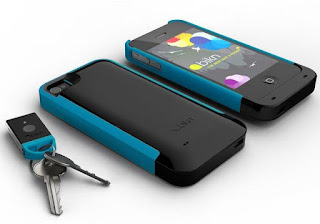
Similar to the Linquet, users use lightweight tags that can clip onto just about any thing (or anyone) you're prone to lose. Simply place the tag on your keys, backpack, or even your dogs collar and the next time that tagged item goes missing, your phone will use low-power radio waves to find it, showing you where the thing is in relation to you and emitting annoying beeps as you draw closer. You can also set up tags to alert you when your items wonder off out of a predetermined range, which is great if like me you have pets that tend wander off or you forget and leave things behind.
Can't find the phone itself? You can even use one of the tags to page it, which works even if your cell is dead or powered off. A wonderful addition for people like me that often loose their phones in the car with little to no battery life!
The BiKN's tracking range is currently 100 feet indoors and 500 feet outside and there is no mention of having the cloud based option that the Linquet has. So if your items wonder off out of range you're still out of luck but hopefully the alarms will alert you well before that happens.
BiKN is currently available and works with the iPhone 4 and iPhone 4S. It will cost $129.99 — and comes with two tags and in a variety of colors. Additional tags come in pairs, and will cost $49.99 for two. The BiKN will work with up to 8 tags at once. But that will increase big-time with the next version of the software, the company says, when it will be able to support up to 256 tags.
As I said these are just a few of the options we've seen on the market that really interested us. I'm sure there are several more that warrant mentioning. The Linquet devices with the real time data upload looks pretty interesting to me. However, anything that keeps me from loosing my keys or wallet would be a god send!
These days there are several devices on the market that can help alleviate the pains of lost or stolen valuables. For locating cellphone there are tons of applications that make it easy to find those. But for those pesky none connected devices what should you do. Well here are a couple of new items that we were recently introduced to that we think you might want to checkout.
Linquet Tags and App
Linquet (pronounced Linket) is an interesting little device that claims to be "the easiest and most comprehensive anti-loss solution."
Founded by Pooya Kazerouni in Vancouver, Canada, Linquet is a coined word meaning "small link" and that is exactly what these are. Linquet users attach small "linquets" to the items they don't want to loose, install a free app on their smartphone and link those "linquets" to their smartphone via Bluetooth. When the phone or any linquet goes out-of-range (e.g. leaving home without your wallet, walking off without your keys) both your phone and your valuable item with the Linquet attached will sound off an alarm, averting the loss.
Linquet is also setup to upload data to the cloud. So in those rare cases where you don't hear the alarm, you can visit the Linquet site and see a time and location stamp giving users the power to find their valuables afterwards. And to find your in-range valuables (e.g. keys in a messy room), you can simply press a button on the phone to immediately locate your keys or you could press the button on a Linquet to find your phone.
Linquet has not launched yet however according to Twitter we should see the devices out soon. If you visit their site you can sign-up to be notified once they are available.
BiKN iPhone Case and Tags
iPhone users might want to checkout the BiKN (pronounced like "beacon"), a combination iPhone case, app and series of tags for tracking commonly lost items.
Similar to the Linquet, users use lightweight tags that can clip onto just about any thing (or anyone) you're prone to lose. Simply place the tag on your keys, backpack, or even your dogs collar and the next time that tagged item goes missing, your phone will use low-power radio waves to find it, showing you where the thing is in relation to you and emitting annoying beeps as you draw closer. You can also set up tags to alert you when your items wonder off out of a predetermined range, which is great if like me you have pets that tend wander off or you forget and leave things behind.
Can't find the phone itself? You can even use one of the tags to page it, which works even if your cell is dead or powered off. A wonderful addition for people like me that often loose their phones in the car with little to no battery life!
The BiKN's tracking range is currently 100 feet indoors and 500 feet outside and there is no mention of having the cloud based option that the Linquet has. So if your items wonder off out of range you're still out of luck but hopefully the alarms will alert you well before that happens.
BiKN is currently available and works with the iPhone 4 and iPhone 4S. It will cost $129.99 — and comes with two tags and in a variety of colors. Additional tags come in pairs, and will cost $49.99 for two. The BiKN will work with up to 8 tags at once. But that will increase big-time with the next version of the software, the company says, when it will be able to support up to 256 tags.
As I said these are just a few of the options we've seen on the market that really interested us. I'm sure there are several more that warrant mentioning. The Linquet devices with the real time data upload looks pretty interesting to me. However, anything that keeps me from loosing my keys or wallet would be a god send!
Motors.co.uk iPhone and Android App
This nifty little app allows iPhone and Android users based in the UK to browse through a selection of up to 160,000 motor vehicles in order to find the that perfect car. This handy little app allows users to search for vehicles by entering a postcode, after which they can browse narrow results based on filters like distance of the seller, vehicle make or model, and price.

For our friends across the pond if you aren't already aware, Motors.co.uk is essentially an alternative to the widely popular site Auto Trader. Much like Auto Trader Motors.co.uk allows users to browse a database of new and used vehicles for sale. The site also provides user reviews, buying guides an "how to's" to help you get the most out of your buying experience.
The Motors.co.uk Car Search app features many of the options found on the main site but not all. A few of the prominent features that aren’t going to be available aren’t typically going to be the ones you’ll need while on the go. You’ll get the most essential item which is mainly going to be the search and pricing functions. Search results will display a quick rundown of each vehicle by make, model, price, mileage, manufacture date, transmission type (manual, automatic), fuel required, color, and of course the distance away from your postcode. When selecting a vehicle profile, you can review even more detailed information about what the vehicle includes as well as browse alternate images.
The Motors.co.uk Car Search app is currently available for iPhone and Android users. Both the website, and the application are free of charge and anyone interested in searching for, or selling, a vehicle can sign up. The Android version of the mobile app can be found in the Google Play market, while the iPhone version can be found in iTunes or the Apple app store.
Monday, June 25, 2012
Orbitz Shows Apple Users Higher Priced Options Than PC Users
We've all heard of the ages old "Apple tax", where as Apple customers are know to be willing to pay a premium for their Macs and other devices over the PC equivalent. Well soon there may be a new meaning to the term, as at least one site is working out plans to push OSX users to more expensive options than their PC and Window user counter parts.
According to the Wall Street Journal, popular travel site Orbitz has been tracking users based on operating system. Their findings suggest that people who use Apple's OSX equipped Mac computer spend as much as 30% more a night on hotels than do users of other operating systems. So the online travel agency is starting to show Apple users different, and sometimes costlier, travel options than Windows visitors see.
 Targeting users based on browser and operating systems is hardly a new concept. Most ads you see now days are going to be targeted ads geared towards your device or your operating system. The question here is rather or not Orbitz (and likely others) are acting deceptively.
Orbitz executives insisted that the same room wasn't being shown at different prices to Mac users, and that customers always retain the option of searching by room price first, the Journal reports. And while the details given in the Journal's report appears to show a legitimate business practice, Orbitz has in years past been hit with fines for employing deceptive practices.
In October, 2011, Orbitz was hit with a $60,000 fine for violating rules prohibiting "deceptive price advertising," by not displaying all the hidden fees in its airline ticket prices, CNET reports.
In 2009, a congressional investigation found that Orbitz and other online retailers had used "marketing companies (that) were found by the government to have "tricked" consumers into entering their e-mail addresses just before they completed purchases at Orbitz and the other retailers. A pop-up ad, which many consumers said appeared to be from the retailer, offered them cash back or a coupon if they keyed in their e-mail address. Those who provided information often had no idea that they were agreeing to join the programs because--you guessed it--the disclosure was buried in fine print."
My thoughts
This makes you wonder how many sites out there are employing this practice and the true legitimacy of the practice. Sites could really easily maintain two separate databases, one geared towards Windows users and one geared towards Apple users. Or they could simply push users from one browser or another towards higher priced items. If Orbitz is simply showing higher priced better equipped rooms that is one thing. If however, they are changing prices based on operating system that is something else altogether, and could be discriminatory.
We put a lot of faith in websites, especially deals type sites, to show us the best options available. If they are specifically targeting one set of users over the other for better/worse deals then you really have to questions the faith in the site's deals.
According to the Wall Street Journal, popular travel site Orbitz has been tracking users based on operating system. Their findings suggest that people who use Apple's OSX equipped Mac computer spend as much as 30% more a night on hotels than do users of other operating systems. So the online travel agency is starting to show Apple users different, and sometimes costlier, travel options than Windows visitors see.
Orbitz executives insisted that the same room wasn't being shown at different prices to Mac users, and that customers always retain the option of searching by room price first, the Journal reports. And while the details given in the Journal's report appears to show a legitimate business practice, Orbitz has in years past been hit with fines for employing deceptive practices.
In October, 2011, Orbitz was hit with a $60,000 fine for violating rules prohibiting "deceptive price advertising," by not displaying all the hidden fees in its airline ticket prices, CNET reports.
In 2009, a congressional investigation found that Orbitz and other online retailers had used "marketing companies (that) were found by the government to have "tricked" consumers into entering their e-mail addresses just before they completed purchases at Orbitz and the other retailers. A pop-up ad, which many consumers said appeared to be from the retailer, offered them cash back or a coupon if they keyed in their e-mail address. Those who provided information often had no idea that they were agreeing to join the programs because--you guessed it--the disclosure was buried in fine print."
My thoughts
This makes you wonder how many sites out there are employing this practice and the true legitimacy of the practice. Sites could really easily maintain two separate databases, one geared towards Windows users and one geared towards Apple users. Or they could simply push users from one browser or another towards higher priced items. If Orbitz is simply showing higher priced better equipped rooms that is one thing. If however, they are changing prices based on operating system that is something else altogether, and could be discriminatory.
We put a lot of faith in websites, especially deals type sites, to show us the best options available. If they are specifically targeting one set of users over the other for better/worse deals then you really have to questions the faith in the site's deals.
Facebook Changed Your Default Email Address Here's How To Change It Back
Facebook seems to be taking more and more liberties with user's profiles these days. First we had a forced switch to the new timeline feature. Then we started seeing more and more ads. Now the social media giant wants to take over your email accounts, or at least those displayed on your "about me" page.
Unless you frequent your own "about me" page you likely don't even realize it, but your default contact email address has just been changed. Earlier today Facebook changed every users email address to their default @facebook.com address that the sites automatically associates with your username. Most if us don't even know that we have a default Facebook email address linked with our accounts, but we do. And now Facebook wants that to be the dominate form of contact on your about me page.
“As we announced back in April, we’ve been updating addresses on Facebook to make them consistent across our site,” a Facebook spokesman said. “In addition to everyone receiving an address, we’re also rolling out a new setting that gives people the choice to decide which addresses they want to show on their timelines,” he said.
Well they didn't give us much choice now did they!!
If you don't want users to use your @fecebook.com email address and want to switch back to whatever your original default was its a pretty easy switch. Simply click your name (go to your own profile), then select "Update Info" or “About” to see the page with all the various profile information about you. Under the “Contact Info” section, select edit to see the various email addresses already associated with your Facebook account, adjust priority, and set the visibility of whichever accounts you want to use.
Facebook has said that the change is intended as a security and privacy measure. The argument was that by offering everyone the same generic @facebook addresses, the company might be able to protect your preferred email and limit its visibility.
My thoughts
I call shenanigans! This doesn't play a a security measure. It plays more like Facebook wanting more advertising options by sending more messages through their servers.
Personally I'm becoming more and more disenfranchised with the site. I've had my two primary email addresses on there since I've signed-up and really don't mind them being there. Only my friends can see my private personal account and if they are on Facebook they aren't going to email me anyways. So for it really doesn't matter which email address is shown. What I don't want though is the site to take their own liberties with my account and change the information without even telling me!
Unless you frequent your own "about me" page you likely don't even realize it, but your default contact email address has just been changed. Earlier today Facebook changed every users email address to their default @facebook.com address that the sites automatically associates with your username. Most if us don't even know that we have a default Facebook email address linked with our accounts, but we do. And now Facebook wants that to be the dominate form of contact on your about me page.
“As we announced back in April, we’ve been updating addresses on Facebook to make them consistent across our site,” a Facebook spokesman said. “In addition to everyone receiving an address, we’re also rolling out a new setting that gives people the choice to decide which addresses they want to show on their timelines,” he said.
Well they didn't give us much choice now did they!!
If you don't want users to use your @fecebook.com email address and want to switch back to whatever your original default was its a pretty easy switch. Simply click your name (go to your own profile), then select "Update Info" or “About” to see the page with all the various profile information about you. Under the “Contact Info” section, select edit to see the various email addresses already associated with your Facebook account, adjust priority, and set the visibility of whichever accounts you want to use.
Facebook has said that the change is intended as a security and privacy measure. The argument was that by offering everyone the same generic @facebook addresses, the company might be able to protect your preferred email and limit its visibility.
My thoughts
I call shenanigans! This doesn't play a a security measure. It plays more like Facebook wanting more advertising options by sending more messages through their servers.
Personally I'm becoming more and more disenfranchised with the site. I've had my two primary email addresses on there since I've signed-up and really don't mind them being there. Only my friends can see my private personal account and if they are on Facebook they aren't going to email me anyways. So for it really doesn't matter which email address is shown. What I don't want though is the site to take their own liberties with my account and change the information without even telling me!
Adobe Releases Fix For Flash Player For Firefox
Earlier this month Adobe issues an update the the Flash player plug-in for Mozilla's Firefox browser. The update, Flash Player 11.3, causes several problems most notably none stop crashes with the Flash player. Adobe has now found a fix for the crashes and has issued an update to Flash Player 11.3.300.262.
As previously reported the initial suspicions pointed to a new sanboxing feature in Flash Player 11.3, but yesterday Adobe claimed that there were "different causes" for the crashes, which seemed to be concentrated on Windows Vista and Windows 7 machines. At this time Adobe hasn't made it clear what these different causes are. Tn a recent blog post they simply state "We continue to work closely with Mozilla to further improve pre-release testing to more reliably catch issues like these."
Flash Player 11.3.300.262 can be downloaded from Adobe's website. Firefox users can also wait for Flash's silent updater to automatically download and install the new plug-in. this is of course if you didn't turn off automatic updates.
I've been running the new update for a few days and have yet to see any crashes or any other issues. So users should be good to go.
As previously reported the initial suspicions pointed to a new sanboxing feature in Flash Player 11.3, but yesterday Adobe claimed that there were "different causes" for the crashes, which seemed to be concentrated on Windows Vista and Windows 7 machines. At this time Adobe hasn't made it clear what these different causes are. Tn a recent blog post they simply state "We continue to work closely with Mozilla to further improve pre-release testing to more reliably catch issues like these."
Flash Player 11.3.300.262 can be downloaded from Adobe's website. Firefox users can also wait for Flash's silent updater to automatically download and install the new plug-in. this is of course if you didn't turn off automatic updates.
I've been running the new update for a few days and have yet to see any crashes or any other issues. So users should be good to go.
Thursday, June 21, 2012
Apple Fined Over Misleading iPad 4G Claims
An Australian court has fined Apple $2.29 million dollars over misleading advertising.
When Apple launched their new iPad earlier this year in Australia it was advertised as being a 4G device despite the fact that the tablet cannot actually connect to the countries only 4G wireless network. Australia has only one 4G network, operated by Telstra Corp, which operates on a different frequency to the 4G on Apple's new iPad. The network operates on a frequency of 1800MHz; the new iPad's LTE 4G hardware only works on frequencies of 700MHz and 2100MHz.
As a result of these "misleading claims" the Australian Competition and Consumer Commission stepped in to take legal action. Which in turn resulted in Justice Mordy Bromberg of the country's Federal Court slamming Apple with a fine that totaled $2.25 million Australia dollars ($2.29 million in US dollars).
Apple previously said it would email all of the new iPad owners in Australia and offer them refunds if they felt they were mislead by the 4G speed claims. Since then the company has also changed the branding of the iPad to show it is "Wi-Fi + Cellular", rather than 4G. However, according to the . AFP.com reports, Justice Bromberg was not satisfied with this gesture. In his ruling the Federal Court Justice said, "The conduct concerned was deliberate and very serious. It exposed a significant proportion of Australian consumers of tablet devices to a misleading representation."
He said Thursday the risk of contravening Australian consumer law would have been "reasonably obvious" to Apple. "In that context, and in the absence of any other explanation, the facts to which I have just referred suggest that Apple's desire for global uniformity was given a greater priority than the need to ensure compliance with the Australian consumer law," he said. "Conduct of that kind is serious and unacceptable."
This isn't the only case in which Apple's advertising has come under question. We previously reported the company was drawing attention from regulators in several other countries because of the 4G speed claims.
When Apple launched their new iPad earlier this year in Australia it was advertised as being a 4G device despite the fact that the tablet cannot actually connect to the countries only 4G wireless network. Australia has only one 4G network, operated by Telstra Corp, which operates on a different frequency to the 4G on Apple's new iPad. The network operates on a frequency of 1800MHz; the new iPad's LTE 4G hardware only works on frequencies of 700MHz and 2100MHz.
As a result of these "misleading claims" the Australian Competition and Consumer Commission stepped in to take legal action. Which in turn resulted in Justice Mordy Bromberg of the country's Federal Court slamming Apple with a fine that totaled $2.25 million Australia dollars ($2.29 million in US dollars).
Apple previously said it would email all of the new iPad owners in Australia and offer them refunds if they felt they were mislead by the 4G speed claims. Since then the company has also changed the branding of the iPad to show it is "Wi-Fi + Cellular", rather than 4G. However, according to the . AFP.com reports, Justice Bromberg was not satisfied with this gesture. In his ruling the Federal Court Justice said, "The conduct concerned was deliberate and very serious. It exposed a significant proportion of Australian consumers of tablet devices to a misleading representation."
He said Thursday the risk of contravening Australian consumer law would have been "reasonably obvious" to Apple. "In that context, and in the absence of any other explanation, the facts to which I have just referred suggest that Apple's desire for global uniformity was given a greater priority than the need to ensure compliance with the Australian consumer law," he said. "Conduct of that kind is serious and unacceptable."
This isn't the only case in which Apple's advertising has come under question. We previously reported the company was drawing attention from regulators in several other countries because of the 4G speed claims.
Senior Friendly Laptops
For this reason, laptops must be outfitted to accommodate the elderly. Whether they've lost their hearing, vision or don't understand complicated computer applications, senior friendly laptops make it easier for them to get used to it. Companies benefit by selling products that everybody can enjoy, no matter their age. The elderly benefit from being able to keep up with the times; this makes the situation a win-win.
Technology Is on Their Side
Many laptops come equipped with specifications that, while not entirely intended to benefit the elderly, do just that. For instance, there are many touch screen, tablet and laptop hybrids that make it seamless for a person to flip through menus with the touch of a finger. This allows an elderly person to not have to understand the inner workings of software and operating systems. If a person can simply touch the screen, they're well on their way to navigating these types of senior friendly laptops.
These screens are often high resolution with sharp picture and video capability, which can also account for someone's poor vision.
Screen Size Is Important
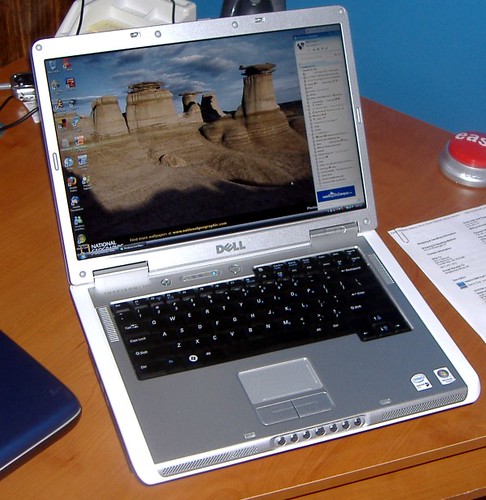
The size of the screen is very crucial to a person seeking a laptop, such as Dell laptops, that is senior friendly. If the screen is wide and tall, a person whose vision isn't as great as it used to be can still see the information clearly and navigate all menus.
A High Powered Sound System
Do some research on the sound cards equipped in the laptop of your choice. You may find that it's not adequate to accommodate a person who has suffered some hearing loss. When browsing reviews, the sound system should be one of the key selling points. Outside of the sound card, it's important to understand just how loud the speakers on a laptop project. Some laptops simply don't project very loud, so even if the sound quality is rich, this laptop wouldn't do much in the way of accommodating seniors suffering hearing loss.
With today's technology, finding a laptop for your needs or the person you're buying for should be fairly simple. There are so many choices available that it's not too hard to find a laptop that will work for your parent, grandparent, or aging relative. Additionally, laptops are a great way to keep in touch— especially if it comes with a webcam that makes chatting online easy.
A New iPhone 5 Connector Means You'll Need To Buy New Accessories
According to the geeks over at TechCrunch when Apple releases the new iPhone 5 customer will see that the company has replaced the standard 30-pin dock port with a new, smaller 19-pin connector. This means that all the current iPhone, iPod and iPad accessories Apple lovers covet will need to be replaced.
TechCrunch claims to have “independently verified” through three independent manufacturers that Apple is “working on” a new 19-pin dock connector, which will debut in the new iPhone 5 later this year. The smaller connector port will replace the long-used 30-pin connector that was seen as a "standard" for all the current Apple products and accessories. Apple has used the standard 30-pin connector since it released the third-generation iPod back in 2003.
If these reports are true, then any cables or other accessories like speaker docks currently on the market will be made obsolete and Apple customers that already shelled out money for their accessories for their previous generation iPhones will need to open their wallets back up and re-buy everything they already own.
I'm generally a bit skeptical about iPhone rumors, as we have seen them be a major miss in the past. In this case though it's not all that unlikely that Apple would redesign the connector. After-all Apple loves to change up the game a bit and put in place proprietary designs that earn them a bit of extra cash flow (not that they need it). The 19-pin design would also make sense since it would save valuable space for the shrinking designs we see.
TechCrunch claims to have “independently verified” through three independent manufacturers that Apple is “working on” a new 19-pin dock connector, which will debut in the new iPhone 5 later this year. The smaller connector port will replace the long-used 30-pin connector that was seen as a "standard" for all the current Apple products and accessories. Apple has used the standard 30-pin connector since it released the third-generation iPod back in 2003.
If these reports are true, then any cables or other accessories like speaker docks currently on the market will be made obsolete and Apple customers that already shelled out money for their accessories for their previous generation iPhones will need to open their wallets back up and re-buy everything they already own.
I'm generally a bit skeptical about iPhone rumors, as we have seen them be a major miss in the past. In this case though it's not all that unlikely that Apple would redesign the connector. After-all Apple loves to change up the game a bit and put in place proprietary designs that earn them a bit of extra cash flow (not that they need it). The 19-pin design would also make sense since it would save valuable space for the shrinking designs we see.
Mobile Casino Technology
Mobile casinos are variants on the standard online casino site, which are designed to be accessed specifically using devices like smartphones and tablets. Most of the major online casino companies have created mobile-friendly versions of their services; recognizing that there is a big demand for this sort of service from people who lead busy lives but would like to be able to access an online casino, from any location, during breaks in their day. The desire to play at online casinos using mobile devices has long been there, but in the past this was difficult due to the tech power and screen size of these devices; both of which led to a less enjoyable and effective experience for users. However, the latest smartphone and tablet devices are making serious advances in terms of processing and battery power, while also offering larger screens with high definition resolution; all of which make accessing online casino services a much more satisfying experience.
When it comes to determining which of the mobile casinos available you should access using your smartphone or tablet, it is probably best to look at those run by companies with a strong reputation within the industry such as Lucky Nugget, as these are more likely to be supported by the major software companies. There are plenty of flashy but unreliable mobile casinos making promises that cannot be delivered upon; these are best avoided.
Tuesday, June 19, 2012
More Details About The Microsoft Surface
Microsoft made a big splash in the tablet market yesterday when the company announced the new Surface line of tablets. The tablets are Microsoft's first entry into the tablet market to date, and from the looks of it the company came out strong.

Now that the aftermath of yesterday's "big event" has settled we have a few more details on the first set of tablets that were announced. Microsoft hinted Surface is the family name meaning there will likely be more devices
Two Surface-branded tablets were announced yesterday. One will be running Windows RT and an Nvidia Tegra ARM processor, the other will run Windows 8 Pro with an Intel Core i5 chip. There are some sharp differences between the two versions of Windows 8, app support being one of the biggest and likely the greatest users will focus on.
The Windows Surface RT will be more a tablet competitor than anything else. It will be running the new version of Windows RT, which is a slight more limited version of Microsoft's new OS. The Surface RT include touch-optimized desktop versions of the new Microsoft Word, Excel, PowerPoint, and OneNote. For new apps, the focus for Windows RT is development on the new Windows runtime, or WinRT which will mean much tighter restrictions as to what can and can't be ran.
There have already been some major concerns voiced by Mozilla and Google over the tight restrictions placed on apps and API access with the Windows RT infrastructure and as of now there has been limited application development. Something I'm sure Microsoft has been working on.
The Surface Pro will be running a full version of the new Windows 8 operating system. So we can think of this more as an Ultrabook, or laptop competitor than just a tablet competitor. Just like any Intel or AMD based laptop a user will have full x86 application support. Which means you can run just about any software that Windows runs now.
The Windows RT Surface will weigh 676 grams, be 9.3mm thick, have a 10.6" ClearType HD display, and be available in 32 GB and 64 GB models. It will have a microSD card reader built-in, along with a USB 2.0 port, micro HD video port, and 2x2 MMO antennae.
The Windows 8 Pro will have the same screen but weigh in at 903g, be 13.5mm thick, and initially offer 64 GB and 128 GB hard drives. The card reader will be a microSDXC, the port will be USB 3.0, video will be Mini DisplayPort video, and it'll have the same 2x2 MMO antennae.
A PDF posted by Microsoft notes that the resolution is "HD" for the Windows RT (ARM) model, and "Full HD" for the Windows 8 Pro model. Unfortunately, "HD" doesn't actually translate well, and actually means the device is likely to end up with a 1366x768 display at 10 inches for the Windows RT edition.
Compare that to the new iPad which weighs in at 652g, is 9.4mm thick, features a 9.7-inch 2048x1536 HD retina display and comes in configurations of 16GB, 32GB and 64GBs. The new Transformer Prime weighs in at 586g, is 8.3mm thick, features a 10.1-inch 1280 x 800 HD IPS screen and comes in configurations of 16GB, 32GB and 64GBs. It also adds a single micro HDMI port and Micro SD Card Reader.
The major gamer changer here however might be the built in kick stand, Touch Cover, a super-thin, flexible keyboard; and Type Cover, a slightly thicker, more laptop-style keyboard. All of these were impressive looking add-ons. While similar items are available for other models they didn't have the sleek sexy look that the Surface cases had.
To me this is where Microsoft is going to make their biggest mistake. I loved some of the features that the Surface had, and it looks like a great tablet. But it needs to be competitively priced. Sure they packed it will features, lots of storage space and a great CPU. However, that just isn't going to be enough to draw the 'tablet crowd' if the price is high. So my advice to Microsoft is to make sure they price these tablets accordingly. Keep the cost as competitive as possible!
Final Conclusion:
Microsoft certainly made waves in the tablet pool. Whether or not the Surface family will be a hit or a flop will certainly depend on a ton of factors. Mainly pricing and completely specifications. Let's keep in mind Microsoft only gave us the basics. One thing is for certain for Microsoft to continue to impress, they had better come in with a solid product. Otherwise their first official leap into the tablet pool might be a sinker.
They didn't allow video streaming from its Surface tablet event last night, but now MS has delivered the entire presentation online. You can view the full video here you can also view more details about the Microsoft surface at Microsoft.com/Surface.

Now that the aftermath of yesterday's "big event" has settled we have a few more details on the first set of tablets that were announced. Microsoft hinted Surface is the family name meaning there will likely be more devices
Microsoft Surface RT and Surface Pro
Ok so MS didn't officially name the two devices yesterday but Surface RT and Surface Pro sound good to me!Two Surface-branded tablets were announced yesterday. One will be running Windows RT and an Nvidia Tegra ARM processor, the other will run Windows 8 Pro with an Intel Core i5 chip. There are some sharp differences between the two versions of Windows 8, app support being one of the biggest and likely the greatest users will focus on.
The Windows Surface RT will be more a tablet competitor than anything else. It will be running the new version of Windows RT, which is a slight more limited version of Microsoft's new OS. The Surface RT include touch-optimized desktop versions of the new Microsoft Word, Excel, PowerPoint, and OneNote. For new apps, the focus for Windows RT is development on the new Windows runtime, or WinRT which will mean much tighter restrictions as to what can and can't be ran.
There have already been some major concerns voiced by Mozilla and Google over the tight restrictions placed on apps and API access with the Windows RT infrastructure and as of now there has been limited application development. Something I'm sure Microsoft has been working on.
The Surface Pro will be running a full version of the new Windows 8 operating system. So we can think of this more as an Ultrabook, or laptop competitor than just a tablet competitor. Just like any Intel or AMD based laptop a user will have full x86 application support. Which means you can run just about any software that Windows runs now.
Surface vs iPad vs Everything Else
When it come to tablets everything these days is compared to the iPad and perhaps a handful of Android tablets like the ASUS Transformer. Lucky enough Microsoft gave us some hard facts related to specs and so far things look fairly impressive.The Windows RT Surface will weigh 676 grams, be 9.3mm thick, have a 10.6" ClearType HD display, and be available in 32 GB and 64 GB models. It will have a microSD card reader built-in, along with a USB 2.0 port, micro HD video port, and 2x2 MMO antennae.
The Windows 8 Pro will have the same screen but weigh in at 903g, be 13.5mm thick, and initially offer 64 GB and 128 GB hard drives. The card reader will be a microSDXC, the port will be USB 3.0, video will be Mini DisplayPort video, and it'll have the same 2x2 MMO antennae.
A PDF posted by Microsoft notes that the resolution is "HD" for the Windows RT (ARM) model, and "Full HD" for the Windows 8 Pro model. Unfortunately, "HD" doesn't actually translate well, and actually means the device is likely to end up with a 1366x768 display at 10 inches for the Windows RT edition.
Compare that to the new iPad which weighs in at 652g, is 9.4mm thick, features a 9.7-inch 2048x1536 HD retina display and comes in configurations of 16GB, 32GB and 64GBs. The new Transformer Prime weighs in at 586g, is 8.3mm thick, features a 10.1-inch 1280 x 800 HD IPS screen and comes in configurations of 16GB, 32GB and 64GBs. It also adds a single micro HDMI port and Micro SD Card Reader.
The major gamer changer here however might be the built in kick stand, Touch Cover, a super-thin, flexible keyboard; and Type Cover, a slightly thicker, more laptop-style keyboard. All of these were impressive looking add-ons. While similar items are available for other models they didn't have the sleek sexy look that the Surface cases had.
Early Hands on Reviews
Sadly I wasn't at the even to get my geeky little hands on the new Surface tablets but several of our favorite geeks where. So here are some of the early reviews.TechCrunch: “It’s a very ambitious effort that the company is making great pains to emphasize has been built by Microsoft from the inside out, from the hardware to the software.”
Engadget: “It’s impossible to weigh in on Surface when we only handled one of the two tablets, and when each hands-on opportunity amounted to a Supermarket Sweep-style tour of various demo areas. Still, even after some brief handling, we feel impressed, almost sobered by what Microsoft’s managed to produce after vowing to take the Windows 8 hardware-software package into its own hands.”
The Verge: “Here it is, Microsoft Surface, the all new, Microsoft-made tablet. We just had our hands on the sleek new device, and we must say — it does feel incredibly well designed.”
BGR: “But what I saw looked really intriguing, and Microsoft has at least in concept created a tablet computer that can also double as a PC. While this alone certainly won’t be enough to help Microsoft compete with the mighty Apple iPad, it does breathe some much-needed life into Microsoft’s mobile product line.”
Mashable: “Overall, this is a good try from Microsoft. Surface will be the PC-based touchscreen to beat, and other Windows tablet-makers have to be quaking in their boots right about now. But the company needs to answer a lot of questions, and let us kick the tires.”
Microsoft Surface Pricing and Availability
Microsoft has yet to provide details on pricing and availability but we have some rumors and speculation and a bit of advice for MS. Rumors suggest the entry level Surface RT (as I'm calling it) might be priced below $300, while the low end Surface Pro (again my name) will be north of $500 perhaps even in the $600 range.To me this is where Microsoft is going to make their biggest mistake. I loved some of the features that the Surface had, and it looks like a great tablet. But it needs to be competitively priced. Sure they packed it will features, lots of storage space and a great CPU. However, that just isn't going to be enough to draw the 'tablet crowd' if the price is high. So my advice to Microsoft is to make sure they price these tablets accordingly. Keep the cost as competitive as possible!
Final Conclusion:
Microsoft certainly made waves in the tablet pool. Whether or not the Surface family will be a hit or a flop will certainly depend on a ton of factors. Mainly pricing and completely specifications. Let's keep in mind Microsoft only gave us the basics. One thing is for certain for Microsoft to continue to impress, they had better come in with a solid product. Otherwise their first official leap into the tablet pool might be a sinker.
They didn't allow video streaming from its Surface tablet event last night, but now MS has delivered the entire presentation online. You can view the full video here you can also view more details about the Microsoft surface at Microsoft.com/Surface.
Confirmed: Newest Flash Update Crashes In Firefox
If like me, you’ve been having trouble with Flash in Firefox, you’re not alone. Mozilla has confirmed that the latest update to Flash is causing problems with some Firefox users. Mozilla is telling users that the company is working with Adobe to fix the problem but as of yet there is no solid solution.
Last week Adobe released Flash Player 11.3, with support for secure sandboxing in Firefox. That is where all the problems started. At this time it's uncertain as to what the exact issue is but it appears to be related to the sandboxing feature. If you aren't aware of what sandboxing is its a built in security feature that is meant to mitigate attacks and keep damage limited so it won’t spill over into the rest of the browser or even the operating system.
For now Mozilla’s suggestion is to “uninstall Flash 11.3 and downgrade to Flash 11.2.”
Some readers might note that Mozilla is saying this is related to video. Personally I've had nothing but issues with just about any type of flash. For now I temporarily disabled Flash and plan on trying to re-install the older version to see if that helps.
If all goes well you should see far fewer crashes when using Flash, or on Flash heavy website.
Some Firefox users on Windows Vista and Windows 7 are experiencing problems when viewing videos in Adobe Flash Player 11.3, released on June 8, 2012. Firefox and/or Flash Player may crash or not load videos using Flash Player, or videos may not display correctly. Adobe and Mozilla are working closely to diagnose and address these issues. In the meantime, Firefox users experiencing problems viewing videos in Flash Player should try the workarounds listed in this help article. We will post an update on this blog once that happens.
Last week Adobe released Flash Player 11.3, with support for secure sandboxing in Firefox. That is where all the problems started. At this time it's uncertain as to what the exact issue is but it appears to be related to the sandboxing feature. If you aren't aware of what sandboxing is its a built in security feature that is meant to mitigate attacks and keep damage limited so it won’t spill over into the rest of the browser or even the operating system.
For now Mozilla’s suggestion is to “uninstall Flash 11.3 and downgrade to Flash 11.2.”
Some readers might note that Mozilla is saying this is related to video. Personally I've had nothing but issues with just about any type of flash. For now I temporarily disabled Flash and plan on trying to re-install the older version to see if that helps.
How to Uninstall Flash 11.3
To uninstall Flash 11.3 on Windows, you will need to use the uninstaller provided by Adobe.- Download the uninstaller program from Adobe - uninstall_flash_player.exe (671 KB)
- At the top of the Firefox window, click on the button ( menu in Windows XP) and then click .
- Run the uninstall Flash program that you download and follow the prompts.
- When you are finished, start Firefox again and continue with the next section - Install Flash 11.2
Install Flash 11.2
- Download the archive of older versions of Flash from the Adobe site - Flash 11.2 (170MB)
- At the top of the Firefox window, click on the button ( menu in Windows XP) and then click .
- Open your downloads folder and look for the file named fp_11.2.202.233_archive.zip
- Double-click the fp_11.2.202.233_archive.zip file and browse though the folders. You will have to look for the Flash 11.2 installer. It is named flashplayer11_2r202_233_win_32bit.exe (If you are using the 64-bit version of Firefox, look for the installer named flashplayer11_2r202_233_win_64bit.exe)
- Drag the installer to your desktop, then double-click it to start the installation.
- The last step of the Flash install program asks you to choose your update method. You should choose Notify me when updates are available to prevent Flash 11.3 from being re-installed automatically.


If all goes well you should see far fewer crashes when using Flash, or on Flash heavy website.
Monday, June 18, 2012
Microsoft's Major Announcement A New Tablet Dubbed 'Surface'
After a lot of anticipation, several rumors and speculation and hype that only Apple has been able to build Microsoft has finally made its major announcement today and it's going to be a new tablet concept dubbed Surface.
Steve Ballmer took main stage today at the highly anticipated event beginning his speech saying, "Windows is the heart and soul of Microsoft, Windows has exceeded our most optimistic predictions. It's in homes, schools, and governments around the world. With Windows 8 we've reimagined Windows to power a new generation of PCs. Windows is the heart and soul of Microsoft. It's proven to be the most flexible, general purpose software ever created. We designed Windows 8 for the world we know. People want access to information, and the ability to create content anywhere and anytime."

He continued, "Today we want to add another piece to the Windows 8 story. We wanted to give Windows 8 its own hardware innovation. It's something new, something different, it's a whole new family of computing devices from MS."
What is it, its the new Microsoft Surface. A Windows 8 tablet, deigned and built specifically for Microsoft and for Windows 8.
Surface will feature two designs, one for Windows RT and one for Windows 8 Pro. The RT version will feature a 9.3mm thin body weighing 675 grams. The Windows 8 Pro tablet will be slightly larger at 13.55mm and 903g. Both tablets feature magnesium VaporMg cases with a permanent scratch and wear resistant surface and an optically bonded 10.6-inch ClearType HD Corning Gorilla Glass 2.0 displays.
The Windows RT Surface will feature an ARM processor, microSD and USB 2.0 slots, Micro HD Video, 2x2 MIMO antennae and will come in either 32 GB or 64 GB capacities. The Windows 8 Pro will feature an Intel core i5 processor, microSDXC and USB 3.0 slots, Mini DisplayPort Video, 2x2 MIMO antennae and either 64 GB or 128 GB of storage.

Surface comes with an integrated kickstand and a 3mm thin, pressure sensitive cover that doubles as a fully functioning keyboard and trackpad. Your Touch Cover connects to your Surface with a single magnetic click, no docks, nothing to be broken. Touch Cover comes in five colors, Pink, Black, Greyish white, Red and Blue
 Suggested retail pricing will be announced closer to availability and is expected to be competitive with a comparable ARM tablet or Intel Ultrabook-class PC. OEMs will have cost and feature parity on Windows 8 and Windows RT.
Fore more details visit Microsoft.com/Surface or view the full Microsoft press release
Microsoft Announces Surface: New Family of PCs for Windows
Steve Ballmer took main stage today at the highly anticipated event beginning his speech saying, "Windows is the heart and soul of Microsoft, Windows has exceeded our most optimistic predictions. It's in homes, schools, and governments around the world. With Windows 8 we've reimagined Windows to power a new generation of PCs. Windows is the heart and soul of Microsoft. It's proven to be the most flexible, general purpose software ever created. We designed Windows 8 for the world we know. People want access to information, and the ability to create content anywhere and anytime."

He continued, "Today we want to add another piece to the Windows 8 story. We wanted to give Windows 8 its own hardware innovation. It's something new, something different, it's a whole new family of computing devices from MS."
What is it, its the new Microsoft Surface. A Windows 8 tablet, deigned and built specifically for Microsoft and for Windows 8.
Surface will feature two designs, one for Windows RT and one for Windows 8 Pro. The RT version will feature a 9.3mm thin body weighing 675 grams. The Windows 8 Pro tablet will be slightly larger at 13.55mm and 903g. Both tablets feature magnesium VaporMg cases with a permanent scratch and wear resistant surface and an optically bonded 10.6-inch ClearType HD Corning Gorilla Glass 2.0 displays.
The Windows RT Surface will feature an ARM processor, microSD and USB 2.0 slots, Micro HD Video, 2x2 MIMO antennae and will come in either 32 GB or 64 GB capacities. The Windows 8 Pro will feature an Intel core i5 processor, microSDXC and USB 3.0 slots, Mini DisplayPort Video, 2x2 MIMO antennae and either 64 GB or 128 GB of storage.
Surface comes with an integrated kickstand and a 3mm thin, pressure sensitive cover that doubles as a fully functioning keyboard and trackpad. Your Touch Cover connects to your Surface with a single magnetic click, no docks, nothing to be broken. Touch Cover comes in five colors, Pink, Black, Greyish white, Red and Blue

Fore more details visit Microsoft.com/Surface or view the full Microsoft press release
Microsoft Announces Surface: New Family of PCs for Windows
Apple Announces 2012 Back To School Promotion
Apple has officially joined Sony and Microsoft in the fight for back-to-school dollars. Today launching the company's annual back-to-school promotion with discounts for, students, parents and school faculty members when they purchase a Mac or iPad.
Unlike Sony and Microsoft, who are both offering deals for gaming consoles, Apple is offering qualifying customers buying a Mac with Education pricing a $100 iTunes card good for music, movies or apps - while those buying the iPad will get a $50 card.

Based on what Apple says on its website, the deal applies to MacBook Pros, MacBook Airs, iMacs and both versions of the iPad -- there's no mention of the Mac mini and Mac Pro.
To qualify for the Back to School Card offer and to get special pricing on a Mac at the Apple Online Store for Education, you must be a college student, a student accepted to a college, a parent buying for a college student, or a faculty or staff member from any grade level. You must also buy before the September 21st cut off date.
For those with several students there is a maximum of four (4) cards per household may be obtained for the purchase of (2) qualifying Apple Computers and two (2) qualifying iPads. For more details visit the Apple Back to School 2012 landing page.
Sony launched their back to school promotion late last week offering customers a free PS3 or PS Vita with a Sony Vaio Purchase while Microsoft is offering customers a free Xbox 320 with qualifying PC purchase.
Unlike Sony and Microsoft, who are both offering deals for gaming consoles, Apple is offering qualifying customers buying a Mac with Education pricing a $100 iTunes card good for music, movies or apps - while those buying the iPad will get a $50 card.

Based on what Apple says on its website, the deal applies to MacBook Pros, MacBook Airs, iMacs and both versions of the iPad -- there's no mention of the Mac mini and Mac Pro.
To qualify for the Back to School Card offer and to get special pricing on a Mac at the Apple Online Store for Education, you must be a college student, a student accepted to a college, a parent buying for a college student, or a faculty or staff member from any grade level. You must also buy before the September 21st cut off date.
For those with several students there is a maximum of four (4) cards per household may be obtained for the purchase of (2) qualifying Apple Computers and two (2) qualifying iPads. For more details visit the Apple Back to School 2012 landing page.
Sony launched their back to school promotion late last week offering customers a free PS3 or PS Vita with a Sony Vaio Purchase while Microsoft is offering customers a free Xbox 320 with qualifying PC purchase.
iPad Owners Might Soon See A Mozilla Browser But It Might Not Be Firefox
Mozilla might own one of the world's top three most popular web browsers with Firefox. However, the company has yet to break into the top smartphone and tablets markets controlled by Apple's iOS and iPad. Things might soon change however as Mozilla's Product Design Team is apparently working on a new WebKit based browser the company has dubbed "Junior".
Working to build things from the the ground up for iPad Mozilla has decided to take a new approach in their iOS browser, and so far looks like a pretty impressive, clutter free experience.
Mozilla's Alex Limi said "We wanted to make something entirely new. We wanted to look into how we could reinvent the browser for a new form factor," he said. He goes so far as to deem Safari for iPad "a miserable experience" all the while acknowledging that it remains the best option available in terms of tablet-based browsing.
iOS, largely due to Apple's walled garden, is a platform where Mozilla has yet to make an impact, he admits. "There are a lot of reasons we should be on iOS even though we can't bring our rendering engine there." Ultimately he says Junior was born out of necessity: as of now, Mozilla has "no vehicle on one of the biggest consumer platforms in the world."
Junior is still very much a work in progress - so any of the design ideas we asee at this stage might not mean much. The team might still decide to change he functions and features related to what each of the buttons will do. The back and + button can both be expanded to reveal six functions, but they haven't reached a final decision on what those functions will be. Still, this new design looks like a cool approach to navigation, and it looks like it could be the perfect fit for tablets.
As of now there aren't many more details about Junior, heck Mozilla hasn't even decided if that will be the official name yet. So we don't know what the possible release date would be. Nor do we know exactly what platforms other than iOS and the iPad it might support.
Working to build things from the the ground up for iPad Mozilla has decided to take a new approach in their iOS browser, and so far looks like a pretty impressive, clutter free experience.
Mozilla's Alex Limi said "We wanted to make something entirely new. We wanted to look into how we could reinvent the browser for a new form factor," he said. He goes so far as to deem Safari for iPad "a miserable experience" all the while acknowledging that it remains the best option available in terms of tablet-based browsing.
iOS, largely due to Apple's walled garden, is a platform where Mozilla has yet to make an impact, he admits. "There are a lot of reasons we should be on iOS even though we can't bring our rendering engine there." Ultimately he says Junior was born out of necessity: as of now, Mozilla has "no vehicle on one of the biggest consumer platforms in the world."
Video linked courtesy The Verge
Junior is still very much a work in progress - so any of the design ideas we asee at this stage might not mean much. The team might still decide to change he functions and features related to what each of the buttons will do. The back and + button can both be expanded to reveal six functions, but they haven't reached a final decision on what those functions will be. Still, this new design looks like a cool approach to navigation, and it looks like it could be the perfect fit for tablets.
As of now there aren't many more details about Junior, heck Mozilla hasn't even decided if that will be the official name yet. So we don't know what the possible release date would be. Nor do we know exactly what platforms other than iOS and the iPad it might support.
Thursday, June 14, 2012
Western Digital Joins The Networking Market Releases Five Wireless Routers
Western Digital is a name synonymous with the hard drive and storage market. So when you hear the company has released a new networking device your first thought is likely geared towards a new network attached hard drive or NAS server or possibly even a new media streaming device like the WD Live TV box. But today the company announced the release of its very first wireless home networking devices which includes five new routers in a new category called the My Net family.

Most companies would generally start of small with a couple entry level devices meant for the everyday mainstream consumer. Not Western Digital, they cam out of the box swinging. WD entered the market with five brand new Dual-Band Routers, all of which proclaim 600Mbs speeds or better.
Their new My Net Family Dual-Band Routers starts with the My Net N600, a true dual-band router that offers 300Mbps on both the 5GHz and 2.4GHz bands. The next step-up is the My Net N750, which boosts the speeds to 450Mbps on the 5GHz, and finally there's the top-tier My Net N900, which offers the 450Mbps data rate on both the 2.4GHz and 5GHz bands. The top tiered, My Net N900, also comes with seven Gigabit LAN ports (as opposed to the four ports found in most wireless routers), and range amplifier antennas for extended range. Both the My Net N750 and My Net N900 feature 2 USB ports for additional storage, printer and media share server use, while the My Net N600 features just a sigle port.
But wait I said they released five routers. Yes in-deed they did. They introduced two offerings dubbed the My Net N900 Central that I personally would love to test drive.

The My Net N900 Central is a router NAS,/Cloud Server all-in-one. It comes with either a 1TB or 2TB hard drive built-in. This router is built for HD streaming or wireless backup and remote access. The My Net N900 Central includes 4 LAN and 1 WLAN Gigabit Ethernet ports for up to 10/100/1000 Mbps wired speeds, 1 USB port for additional storage, printer and media share server use.
Remote access to My Net N900 Central is available on any computer through www.WD2go.com and with WD mobile apps for iPad, iPhone, iPod touch or Android smartphones and tablets. In addition to keeping content safe at home and always accessible while away from home, users can rely on My Net N900 Central for automatic wireless backup with the included WD SmartWare software for Windows, while Mac users can utilize all the features of Apple Time Machine backup software. Additionally, any WD external hard drive with SmartWare software can connect directly to a My Net router to wirelessly backup all PC computers in the home.
Collectively, all five of WD's My Net routers support FastTrack, UPnP and DLNA media streaming standards, Time Machine, and personal cloud storage. FasTrack technology detects Internet favorites like Netflix and YouTube and automatically prioritizes them for smooth HD streaming. FastTrack is basically a type of QoS (quality of service) that automatically detects and prioritizes Internet bandwidth based on types of traffic. By default FastTrack allows entertainment-related services -- such as media streaming, VoIP (voice over IP), and so on -- precedence over other services, such as Web surfing and downloading. FastTrack Plus, available in the N900 and N900 Central routers, offers support for more simultaneous data streams at a time than the standard FastTrack, available in the N600 and N750 routers.
Pricing starts at $79.99 for the My Net N600, $119.99 for the My Net N750 and $179.99 My Net N900. If you want to step-up to the My Net N900 Central with built in storage it's going to cost you. The 1TB My Net N900 Central runs $299.99 while the 2TB version will set you back $349.99. My Net N900, My Net N750, and the My Net N600 will be available immediately at select U.S. retailers and online at the wdstore.com. My Net N900 Central will be available next quarter.

Most companies would generally start of small with a couple entry level devices meant for the everyday mainstream consumer. Not Western Digital, they cam out of the box swinging. WD entered the market with five brand new Dual-Band Routers, all of which proclaim 600Mbs speeds or better.
Their new My Net Family Dual-Band Routers starts with the My Net N600, a true dual-band router that offers 300Mbps on both the 5GHz and 2.4GHz bands. The next step-up is the My Net N750, which boosts the speeds to 450Mbps on the 5GHz, and finally there's the top-tier My Net N900, which offers the 450Mbps data rate on both the 2.4GHz and 5GHz bands. The top tiered, My Net N900, also comes with seven Gigabit LAN ports (as opposed to the four ports found in most wireless routers), and range amplifier antennas for extended range. Both the My Net N750 and My Net N900 feature 2 USB ports for additional storage, printer and media share server use, while the My Net N600 features just a sigle port.
But wait I said they released five routers. Yes in-deed they did. They introduced two offerings dubbed the My Net N900 Central that I personally would love to test drive.

The My Net N900 Central is a router NAS,/Cloud Server all-in-one. It comes with either a 1TB or 2TB hard drive built-in. This router is built for HD streaming or wireless backup and remote access. The My Net N900 Central includes 4 LAN and 1 WLAN Gigabit Ethernet ports for up to 10/100/1000 Mbps wired speeds, 1 USB port for additional storage, printer and media share server use.
Remote access to My Net N900 Central is available on any computer through www.WD2go.com and with WD mobile apps for iPad, iPhone, iPod touch or Android smartphones and tablets. In addition to keeping content safe at home and always accessible while away from home, users can rely on My Net N900 Central for automatic wireless backup with the included WD SmartWare software for Windows, while Mac users can utilize all the features of Apple Time Machine backup software. Additionally, any WD external hard drive with SmartWare software can connect directly to a My Net router to wirelessly backup all PC computers in the home.
Collectively, all five of WD's My Net routers support FastTrack, UPnP and DLNA media streaming standards, Time Machine, and personal cloud storage. FasTrack technology detects Internet favorites like Netflix and YouTube and automatically prioritizes them for smooth HD streaming. FastTrack is basically a type of QoS (quality of service) that automatically detects and prioritizes Internet bandwidth based on types of traffic. By default FastTrack allows entertainment-related services -- such as media streaming, VoIP (voice over IP), and so on -- precedence over other services, such as Web surfing and downloading. FastTrack Plus, available in the N900 and N900 Central routers, offers support for more simultaneous data streams at a time than the standard FastTrack, available in the N600 and N750 routers.
Pricing starts at $79.99 for the My Net N600, $119.99 for the My Net N750 and $179.99 My Net N900. If you want to step-up to the My Net N900 Central with built in storage it's going to cost you. The 1TB My Net N900 Central runs $299.99 while the 2TB version will set you back $349.99. My Net N900, My Net N750, and the My Net N600 will be available immediately at select U.S. retailers and online at the wdstore.com. My Net N900 Central will be available next quarter.
Australian Tech Retailer Taxes Internet Explorer 7 Users
Any webmaster out there knows that developing websites with cross browser support can at times be messy. A site that looks and performs great on one browser might not performs so well on another. Well one internet guru is taking matters into his own hands by implementing what he believes to be “the world’s first ‘Internet Explorer 7 Tax.’”

Ruslan Kogan may not be a known entity in the U.S. (yes I had to look it up when I first read this story), is well know in the land down under. The Australian entrepreneur is a pioneer of online retail and happens to be the country’s wealthiest self-made person under the age of 30. Kogan founded Kogan.com, a manufacturer and direct retailer of consumer electronics that’s projected to hit over $100 million in sales this year. But, more importantly, the guy seems to hate the fact that his developers have to spend added time, and money developing his sites that already run seamlessly on Firefox, Chrome and Opera by building a friendly version of the site for Internet Explorer 7 users.
He hates it so much that he is willing to wage war against IE7 and charge his customers a 6.8% tax on any item purchased on his site.
In a posting on his official blog Kogan explains his reasoning
Now we may all laugh at this at first, but think about it. If it takes me an extra hour or two to develop a site for an older browser. That is cost out of my pocket. So why not pass some of the expense on. By means of telling you you need to upgrade, Kogan is actually doing you a favor. Once, by added security, and again by saving you the cost he is imposing.
Now obviously this is a bit of a PR stunt. Those Aussie's are well known for pulling off lavish stunts like this just to garner a bit of fame around the world. But it does have some merit. I'd just like to seem him take it a step further and add in a warning for users of any dated browser not just IE7. I mean IE7 isn't really that old, or that bad. It has been a bit of a P.I.T.A. to code for but at least its not IE6 or early editions of some of the other browsers with loads of security holes.

Ruslan Kogan may not be a known entity in the U.S. (yes I had to look it up when I first read this story), is well know in the land down under. The Australian entrepreneur is a pioneer of online retail and happens to be the country’s wealthiest self-made person under the age of 30. Kogan founded Kogan.com, a manufacturer and direct retailer of consumer electronics that’s projected to hit over $100 million in sales this year. But, more importantly, the guy seems to hate the fact that his developers have to spend added time, and money developing his sites that already run seamlessly on Firefox, Chrome and Opera by building a friendly version of the site for Internet Explorer 7 users.
He hates it so much that he is willing to wage war against IE7 and charge his customers a 6.8% tax on any item purchased on his site.
In a posting on his official blog Kogan explains his reasoning
Today at Kogan we've implemented the world's first "Internet Explorer 7 Tax". The new 6.8% tax comes into effect today on all products purchased from Kogan.com by anyone still insistent on using the antique browser.
The way we've been able to keep our prices so low is by using technology to make our business efficient and streamlined. One of the things stopping that is our web team having to spend a lot of time making our new website look normal on IE7. This is an extremely old browser, so from today, anyone buying from the site who uses IE7 will be lumped with a 6.8% surcharge - that's 0.1% for each month IE7 has been on the market:
As Internet citizens, we all have a responsibility to make the Internet a better place. By taking these measures, we are doing our bit. This will help us increase our efficiency, help keep prices for all smart shoppers down, and hopefully help eradicate the world of the pain in the rear that is IE7!
So, what are you waiting for? Time to upgrade your browser!
Now we may all laugh at this at first, but think about it. If it takes me an extra hour or two to develop a site for an older browser. That is cost out of my pocket. So why not pass some of the expense on. By means of telling you you need to upgrade, Kogan is actually doing you a favor. Once, by added security, and again by saving you the cost he is imposing.
Now obviously this is a bit of a PR stunt. Those Aussie's are well known for pulling off lavish stunts like this just to garner a bit of fame around the world. But it does have some merit. I'd just like to seem him take it a step further and add in a warning for users of any dated browser not just IE7. I mean IE7 isn't really that old, or that bad. It has been a bit of a P.I.T.A. to code for but at least its not IE6 or early editions of some of the other browsers with loads of security holes.
Wednesday, June 13, 2012
Review: NETGEAR WN3000RP Universal WiFi Range Extender
Wireless networking is a must have these days. Not only do devices like our laptops and desktops need a good solid network connection but now days tablets like the iPad, or gaming units like the PS3 even require them.
No matter how good our wireless routers have gotten over the years the one Achilles heel that almost every device has is still weak reception at a long distance or slower performance at the edges of wireless coverage. Enter Wireless access points and range extenders. The small devices can be placed to connect just about anywhere within range of a router and provide a boost of performance where the connection drops off. One such unit is the Netgear WN3000RP Universal Wi-Fi Range Extender.

The Netgear WN3000RP is a plug and play device that is no bigger than the wall socket it needs for power. It has quick and easy setup and allows you to extended your network well beyond its current reach.

Option A Using WPS: If you have a Netgear router with WPS advanced wireless setup things can't be easier. Simply plug the Universal Extender into an outlet that is the outer edge of your network coverage, power the Extender on by using the on/off button on the right side of the Extender. Push the WPS button on your router, and then push the WPS button on the Extender. The automated WPS will simply setup your Extender to connect to your router with a WPA2 pre-shared key and start sharing the routers wireless connection.
The Extender needs to be within acceptable range of your existing wireless router. If the Extender is not within range of your wireless router, the Extender will not be able to connect to your router and extend the connection further.
Option B Manual Setup: If like me you use customer router settings, or use a none Netgear branded router (I still use my Linksys E4200v2) or for that fact there is some reason your router doesn't support the WPS automated wireless setup then you will need to connect directly to the NETGEAR WN3000RP Extender either via wired or wireless.
I prefer to connect via wire, it just makes things a bit simpler. All you need to do is plug the device in out on the "fringe" of your network where you want to leave it, plug a cable into the network port on your Extender and then to a laptop or computer. Once you are connected, open up your web browser and try to connect to any website, you will then be automatically re-directed to the www.mywifiext.net web page. This is the setup page for the Netgear Universal WiFi Range Extender. If you are prompted to enter a password by default the user name is admin and the password is password.
If you want to connect wirelessly simply open up your wireless connection manager on your laptop or other wireless capable device and connect to the network connected titled NETGEAR_EXT. Once you are connected, open up your web browser and try to connect to any website, you will then be automatically re-directed to the www.mywifiext.net web page. This is the setup page for the Netgear Universal WiFi Range Extender. If you are prompted to enter a password by default the user name is admin and the password is password.
Follow through the steps on the setup web page on, click save and the device will reboot. Once your NETGEAR WN3000RP is rebooted go back to your wireless connection manager on your laptop and now search for your SSID (or network connection) that you normally use, but this time you will see a new one with the SSID of yours with "_EXT" added onto it. That is the SSID for your wireless Extender. Setup this new SSID and have your wireless device automatically connect to it. Once this is done you should be able to seamlessly roam between your default SSID and your new extended SSID hopefully giving you fuller coverage and better speeds.
In a portion of our testing we actually used our extender as a wi-fi adapter. We connected it directly to a desktop that needed a wireless network connection. This is one scenario that many people forget about, having the single RJ-45 port on the device lets you use it as a wireless adapter for just about anything that doesn't already have a wireless connection. With this setup we were pleasantly surprised with the range the WN3000RP achieved and the speeds. We were able to stream videos seamlessly, with few if any noticeable interruptions. We also noticed a fairly reasonable boost in signal strength over the current Wireless G pci device the computer had been using. This was most likely due to fully utilizing the Wireless N capabilities of our router.
Conclusion
There are lots of factors that effect your wireless network and its range. What channels your router uses, the placement of the wireless router, and even interference issues from everyday items like cordless phones, microwave ovens, ect. all come into play as to how the wireless signal propagates through your home. A good range extender can definitely come in handy for those trying to extend coverage beyond the four walls or for those trying to cover multiple floors.
For me the NETGEAR WN3000RP Universal WiFi Range Extender held up to everything Netgear said it would. While we didn't get to thoroughly test the performance everything else worked as expected. Setup was quick and easy, we were able to use the extender in less than a few minutes right out of the box. So if all you want is to extend the wireless footprint in your home the Netgear Universal WiFi Range Extender just maybe what you need to accomplish that. It has a good price tag, has a small foot print so you hardly know its there, and just about any home user can set it up.
NETGEAR WN3000RP Pricing and Availability
The WN3000RP WiFi Range Extender is available at most major online retailers. MSRP is $69.99 however pricing online ranges from $66.28 on Amazon to $66.58 on Newegg. For those looking to purchase in store you can get the extender at most major retailers including Best-But and Staples for $69.99
No matter how good our wireless routers have gotten over the years the one Achilles heel that almost every device has is still weak reception at a long distance or slower performance at the edges of wireless coverage. Enter Wireless access points and range extenders. The small devices can be placed to connect just about anywhere within range of a router and provide a boost of performance where the connection drops off. One such unit is the Netgear WN3000RP Universal Wi-Fi Range Extender.

The Netgear WN3000RP is a plug and play device that is no bigger than the wall socket it needs for power. It has quick and easy setup and allows you to extended your network well beyond its current reach.
NETGEAR WN3000RP Specifications and Features
- Wireless Security: WiFi Protected Access (WPA-PSK, WPA2-PSK) and WEP
- Wireless Standards: 802.11 B/G/N 2.4ghz only (does not support 5ghz 802.11A)
- Plug-and-play: Sets up in minutes, no need to insert a CD or plug in Ethernet cables
- Push ‘N’ Connect: Push ‘N’ Connect using Wi-Fi Protected Setup (WPS) connects computers and/or routers to the Extender quickly and securely
- System Requirements:
- 802.11 B/G/N wireless router, gateway or access point
- Microsoft Windows 7, Vista, XP, 2000, Mac OS, UNIX, or Linux.
- Microsoft Internet Explorer 5.0, Firefox 2.0 or Safari 1.4 or higher.
- Advanced Features:
- Extend internet access for wireless devices through out your home.
- Repeats 2.4ghz WiFi signal from your wireless router and access point.
- 2 x External Antenna 1 x 10/100M Ethernet Port

NETGEAR WN3000RP Setup
The setup on almost any network device now days is as simple and straight forward as you can get and the NETGEAR WN3000RP is no different. You have two options:Option A Using WPS: If you have a Netgear router with WPS advanced wireless setup things can't be easier. Simply plug the Universal Extender into an outlet that is the outer edge of your network coverage, power the Extender on by using the on/off button on the right side of the Extender. Push the WPS button on your router, and then push the WPS button on the Extender. The automated WPS will simply setup your Extender to connect to your router with a WPA2 pre-shared key and start sharing the routers wireless connection.
The Extender needs to be within acceptable range of your existing wireless router. If the Extender is not within range of your wireless router, the Extender will not be able to connect to your router and extend the connection further.
Option B Manual Setup: If like me you use customer router settings, or use a none Netgear branded router (I still use my Linksys E4200v2) or for that fact there is some reason your router doesn't support the WPS automated wireless setup then you will need to connect directly to the NETGEAR WN3000RP Extender either via wired or wireless.
I prefer to connect via wire, it just makes things a bit simpler. All you need to do is plug the device in out on the "fringe" of your network where you want to leave it, plug a cable into the network port on your Extender and then to a laptop or computer. Once you are connected, open up your web browser and try to connect to any website, you will then be automatically re-directed to the www.mywifiext.net web page. This is the setup page for the Netgear Universal WiFi Range Extender. If you are prompted to enter a password by default the user name is admin and the password is password.
If you want to connect wirelessly simply open up your wireless connection manager on your laptop or other wireless capable device and connect to the network connected titled NETGEAR_EXT. Once you are connected, open up your web browser and try to connect to any website, you will then be automatically re-directed to the www.mywifiext.net web page. This is the setup page for the Netgear Universal WiFi Range Extender. If you are prompted to enter a password by default the user name is admin and the password is password.
Follow through the steps on the setup web page on, click save and the device will reboot. Once your NETGEAR WN3000RP is rebooted go back to your wireless connection manager on your laptop and now search for your SSID (or network connection) that you normally use, but this time you will see a new one with the SSID of yours with "_EXT" added onto it. That is the SSID for your wireless Extender. Setup this new SSID and have your wireless device automatically connect to it. Once this is done you should be able to seamlessly roam between your default SSID and your new extended SSID hopefully giving you fuller coverage and better speeds.
NETGEAR WN3000RP Performance
We have a love hate relationship with testing networking devices in or around our office. Unfortunately the area that we have available to test our network performance is really limited. So much so that it's hard to quantify testing. We have no areas that we are out of range of our Linksys E4200v2, and really have no way to push the NETGEAR WN3000RP to the outer limits of our network. That said, we did notice with the NETGEAR WN3000RP connected to some of the furthest areas of the office we saw better overall performance. We noticed an increase in both signal strength and download speeds. So even if it wasn't adding distance to our network it still added performance.In a portion of our testing we actually used our extender as a wi-fi adapter. We connected it directly to a desktop that needed a wireless network connection. This is one scenario that many people forget about, having the single RJ-45 port on the device lets you use it as a wireless adapter for just about anything that doesn't already have a wireless connection. With this setup we were pleasantly surprised with the range the WN3000RP achieved and the speeds. We were able to stream videos seamlessly, with few if any noticeable interruptions. We also noticed a fairly reasonable boost in signal strength over the current Wireless G pci device the computer had been using. This was most likely due to fully utilizing the Wireless N capabilities of our router.
Conclusion
There are lots of factors that effect your wireless network and its range. What channels your router uses, the placement of the wireless router, and even interference issues from everyday items like cordless phones, microwave ovens, ect. all come into play as to how the wireless signal propagates through your home. A good range extender can definitely come in handy for those trying to extend coverage beyond the four walls or for those trying to cover multiple floors.
For me the NETGEAR WN3000RP Universal WiFi Range Extender held up to everything Netgear said it would. While we didn't get to thoroughly test the performance everything else worked as expected. Setup was quick and easy, we were able to use the extender in less than a few minutes right out of the box. So if all you want is to extend the wireless footprint in your home the Netgear Universal WiFi Range Extender just maybe what you need to accomplish that. It has a good price tag, has a small foot print so you hardly know its there, and just about any home user can set it up.
NETGEAR WN3000RP Pricing and Availability
The WN3000RP WiFi Range Extender is available at most major online retailers. MSRP is $69.99 however pricing online ranges from $66.28 on Amazon to $66.58 on Newegg. For those looking to purchase in store you can get the extender at most major retailers including Best-But and Staples for $69.99
iFixit Teardown Of The New MacBook Pro, Describes It As Un-Repairable
At this year's WWDC event Apple launched the new MacBook Pro with Retina Display. Not wanting to waste anytime playing with it the guys over at iFixit have already done what they do best. They tore it apart!
I don't know how the guys over at iFixit get their hands on devices so quickly, but we are certainly glad they do. Earlier this week theu got their hands on one of the new, ridiculously powerful, ridiculously expensive MacBook Pros with Retina Display, and of cours promptly posted a MacBook Pro with Retina Display Teardown.
The good news, iFixit seems to agree with Apple, who has already proclaimed that this is the "best computer Apple has ever made." The bad news, aside from how pretty and well-made everything is, it is seemingly "the least repairable laptop iFixit has ever taken apart."
Some lowlights: As with previous Apple devices Apple has again gone above and beyond in making it difficult for consumers to even crack open their devices. The MacBook Pro with Retina display is guarded by Apple's proprietary pentalobe screws, which iFixit is well equipped to handle but most consumers might not be.
After prying the case open the news just gets worse. Apple has saw to it that the RAM is soldered down. This means that you won't be able to add RAM, nor would you be able to service the RAM if it fails. So anyone looking to go cheap and add-on later might rethink that idea and max their systems out at 16GBs now. To make matters worse the proprietary SSD isn't upgradeable either (yet), as it is similar but not identical to the one in the Macbook Air. It is a separate daughtercard, that is an Apple only design that so far no one has been able to find or replace.
To add to a DIY'ers misery is the surprising fact that the lithium-polymer battery is glued rather than screwed into the case, which increases the chances that it'll break during disassembly. The battery also covers the trackpad cable, which tremendously increases the chance that the user will shear the cable in the battery removal process. So if your battery goes bad, you'll have to ship your MacBook Pro off rather than risk breaking something else.
Last on the list is the display assembly is completely fused, and there’s no glass protecting it. If anything ever fails inside the display, you will need to replace the entire extremely expensive assembly. That means really bad news for those of us that are always breaking things!
For more details on what iFixit found checkout the full MacBook Pro with Retina Display Teardown.
 |
| Image Courtesy iFixit |
I don't know how the guys over at iFixit get their hands on devices so quickly, but we are certainly glad they do. Earlier this week theu got their hands on one of the new, ridiculously powerful, ridiculously expensive MacBook Pros with Retina Display, and of cours promptly posted a MacBook Pro with Retina Display Teardown.
The good news, iFixit seems to agree with Apple, who has already proclaimed that this is the "best computer Apple has ever made." The bad news, aside from how pretty and well-made everything is, it is seemingly "the least repairable laptop iFixit has ever taken apart."
Some lowlights: As with previous Apple devices Apple has again gone above and beyond in making it difficult for consumers to even crack open their devices. The MacBook Pro with Retina display is guarded by Apple's proprietary pentalobe screws, which iFixit is well equipped to handle but most consumers might not be.
After prying the case open the news just gets worse. Apple has saw to it that the RAM is soldered down. This means that you won't be able to add RAM, nor would you be able to service the RAM if it fails. So anyone looking to go cheap and add-on later might rethink that idea and max their systems out at 16GBs now. To make matters worse the proprietary SSD isn't upgradeable either (yet), as it is similar but not identical to the one in the Macbook Air. It is a separate daughtercard, that is an Apple only design that so far no one has been able to find or replace.
To add to a DIY'ers misery is the surprising fact that the lithium-polymer battery is glued rather than screwed into the case, which increases the chances that it'll break during disassembly. The battery also covers the trackpad cable, which tremendously increases the chance that the user will shear the cable in the battery removal process. So if your battery goes bad, you'll have to ship your MacBook Pro off rather than risk breaking something else.
Last on the list is the display assembly is completely fused, and there’s no glass protecting it. If anything ever fails inside the display, you will need to replace the entire extremely expensive assembly. That means really bad news for those of us that are always breaking things!
For more details on what iFixit found checkout the full MacBook Pro with Retina Display Teardown.
Sony's Back To School Deal A Free PS3 or PS Vita With Sony Vaio Purchase
Companies are looking to cash in on those back to school shoppers and hope to sweeten the deal a bit by offering discounts on their other devices. Not only gaining a PC or laptop customer but gainign a gamers. So many are now offered free gaming consoles or even free software. If you are a Sony fan, and a gamer, that is looking for a new laptop or Ultrabook to take to school with you this year you could walk away with a free gaming console.
Microsoft might best be known for back to school promotions with the company's Xbox promotion. But this year Sony is offering up a deal that might lure away some shoppers. Sony announced that students and faculty who purchase an eligible VAIO machine will get to choose between a free PlayStation 3 160GB, a PlayStation Vita Wi-Fi, a $200 discount on select PlayStation gear, or or 8% off a Vaio PC purchase.

Several Ultrabooks and laptops qualify for the offer as well as a few all-in-one machines. The cheapest deal we could find is the Vaio 13.3″ T Series Custom Ultrabook that includes a Core i5-3317U running at 1.7GHz, 4GB RAM, 320GB hard drive, Intel HD Graphics 4000 GPU, and 13.3-inch display. All for just $749.89 including a free carry case worth $50. The prices escalate beyond that right up to the $2,999.99 for the Vaio Z Series featuring a 13.1" Full HD display, 3rd gen Intel Core i7-3612QM (2.10/3.10GHz) , 8GB RAM and a 512GB (256GB x2) SSD. But in all cases you have the option of an additional device for free or discount off another purchase.
You can get the PS3 and Vita with a coupon code (FREEPS3 or FREEVITA), but you'll have to call Sony for more options (1-877-647-7699). Alternatively, CAMPUS8 offers a flat 8% discount on your purchase. Either way if you’re interested in seeing what Sony’s VAIO PCs have to offer or to get more info on the current promotion, pop on over to Sony’s website for the details.
Microsoft might best be known for back to school promotions with the company's Xbox promotion. But this year Sony is offering up a deal that might lure away some shoppers. Sony announced that students and faculty who purchase an eligible VAIO machine will get to choose between a free PlayStation 3 160GB, a PlayStation Vita Wi-Fi, a $200 discount on select PlayStation gear, or or 8% off a Vaio PC purchase.

Several Ultrabooks and laptops qualify for the offer as well as a few all-in-one machines. The cheapest deal we could find is the Vaio 13.3″ T Series Custom Ultrabook that includes a Core i5-3317U running at 1.7GHz, 4GB RAM, 320GB hard drive, Intel HD Graphics 4000 GPU, and 13.3-inch display. All for just $749.89 including a free carry case worth $50. The prices escalate beyond that right up to the $2,999.99 for the Vaio Z Series featuring a 13.1" Full HD display, 3rd gen Intel Core i7-3612QM (2.10/3.10GHz) , 8GB RAM and a 512GB (256GB x2) SSD. But in all cases you have the option of an additional device for free or discount off another purchase.
You can get the PS3 and Vita with a coupon code (FREEPS3 or FREEVITA), but you'll have to call Sony for more options (1-877-647-7699). Alternatively, CAMPUS8 offers a flat 8% discount on your purchase. Either way if you’re interested in seeing what Sony’s VAIO PCs have to offer or to get more info on the current promotion, pop on over to Sony’s website for the details.
Crytek Banking Future On Free-To-Play Games
Popular video game developer Crytek will soon be moving to a free-to-play only business model. All upcoming Crytek projects will consist exclusively of AAA free-to-play games, company CEO Cevat Yerli told Videogamer. This will take effect after the company's current projects area released which includes the latest addition to the Crysys line Crysis 3.
Yerli said:
Once Crytek has completed its current contracts with traditional boxed products, the game developer will only produce F2P titles - supported by its new social gaming platform, GFACE. Crytek Kiev's multiplayer FPS title Warface is said to be the company's first foray into the free-to-play sector. Warface is A military shooter set in the near future, the game claims to offer a cinematic experience with next-gen visuals, artificial intelligence, and physics. It is expected to be released in 2012.
Yerli said:
"As we were developing console games we knew, very clearly, that the future is online and free-to-play. Right now we are in the transitional phase of our company, transitioning from packaged goods games into an entirely free-to-play experience.
What this entails is that our future, all the new games that we're working on, as well new projects, new platforms and technologies, are designed around free-to-play and online, with the highest quality development.
If you look at what kind of games are done in the packaged goods market, with DLCs and premium services and whatnot, it's literally milking the customers to death."
Once Crytek has completed its current contracts with traditional boxed products, the game developer will only produce F2P titles - supported by its new social gaming platform, GFACE. Crytek Kiev's multiplayer FPS title Warface is said to be the company's first foray into the free-to-play sector. Warface is A military shooter set in the near future, the game claims to offer a cinematic experience with next-gen visuals, artificial intelligence, and physics. It is expected to be released in 2012.
Thursday, June 07, 2012
Postcard Marketing A Low Tech Approach For A High Tech World
This is our third post in a series of ideas for marketing your websites or blogs. We've discussed business cards, custom stickers and now I'm going really old school with postcards.
Now you might think being a tech geek I'd be pushing high tech marketing ideas and usually I would. But some of these low tech approaches can really pay dividends. They offer a bit more personal touch than just your everyday mass e-mailing. They are far less intrusive than e-mail, have less competition and of course are a bit more hands on as your recipient can't just click to trash it.
If you run a small business, website or forum that asks users to sign-up with a mailing address these little cards can produce a surge of traffic to your web site or a flood of high-quality sales leads. For businesses you can print postcards with tons of information on sales or special promotions or even coupons. For websites you can add in smaller things like incentives such as free gifts or drawings for checking out your site or responding with emails.
Your postcards don't even have to be marketing material, you can have postcards printed up as birthday cards to send out to forum members or customers on your mailing list. In the tech age sometimes it's the thought that counts and these personal touches have bigger meaning than just that random birthday email!
USPS has the following tips for an effective postcard marketing campaign
The bottom line is marketing methods don’t have to be high-tech or expensive in order to be effective. For many types of startup ventures, a simple and cost-effective direct mail postcard marketing campaign might prove just the ticket for kick-starting company sales or website visits.
Now you might think being a tech geek I'd be pushing high tech marketing ideas and usually I would. But some of these low tech approaches can really pay dividends. They offer a bit more personal touch than just your everyday mass e-mailing. They are far less intrusive than e-mail, have less competition and of course are a bit more hands on as your recipient can't just click to trash it.
If you run a small business, website or forum that asks users to sign-up with a mailing address these little cards can produce a surge of traffic to your web site or a flood of high-quality sales leads. For businesses you can print postcards with tons of information on sales or special promotions or even coupons. For websites you can add in smaller things like incentives such as free gifts or drawings for checking out your site or responding with emails.
Your postcards don't even have to be marketing material, you can have postcards printed up as birthday cards to send out to forum members or customers on your mailing list. In the tech age sometimes it's the thought that counts and these personal touches have bigger meaning than just that random birthday email!
USPS has the following tips for an effective postcard marketing campaign
- Make sure they’re eye-catching: Your postcard doesn’t have to be art, but it helps if it’s attractive. Adding a high quality photo or other image will help
- Keep it simple: It’s a postcard, not a novel. Pretend every word is costing you $500. A jumble of information won’t do it. Simple, bold headlines like “Fall Fashions Are In!” or “50% Off Cookware” work best - then explain where, when and a few other details
- Timing is everything: Messages such as “Your Service Contract Expires June 1” work great - if you have a timely message of some kind for your customers, use it
- There are two-sides to that card: Be sure to use both sides of your postcard, but not every inch. Use one side like a poster and the other for a few details. Or put an ad on one side and a personal message on the other
- Double duty: A postcard can double as a coupon, gift certificate or event ticket. Ask people to present the card to claim an offer. It’s an easy way to measure effectiveness
The bottom line is marketing methods don’t have to be high-tech or expensive in order to be effective. For many types of startup ventures, a simple and cost-effective direct mail postcard marketing campaign might prove just the ticket for kick-starting company sales or website visits.
LinkedIn Password Breach What You Need To Know
LinkedIn has confirmed that hackers have gained access to some of the social network's passwords. While all these passwords were protected by SHA-1 encryption, hackers have been able to crack that encryption and have now been posting the exact passwords and logins of some of the 6million or so users that were affected.
"We can confirm that some of the passwords that were compromised correspond to LinkedIn accounts," LinkedIn director Vincente Silveira wrote in a blog post. "We are continuing to investigate this situation."
By now affected members should have received an email with instructions on how to reset their passwords; as their current passwords will not work. They will also receive an email with more information on what happened. The catch is that now, we are seeing an influx of spam and other malicious emails trying to trick seemingly unaffected users into clicking malicious links so that phishers can steal their passwords. So users need to be vigilant, that those official looking LinkedIn emails may not be the real thing.
You should go directly to the LinkedIn home page to change any login information and verify that the page is secure with an HTTPS url. Do not BLINDLY click links in any emails you receive!
Password management firm LastPass created a password checker tool for LinkedIn, and one for eHarmony. LastPass will run your password against the database of leaked passwords, and see if they can find a match. It will alert you even if your password has not yet been cracked. If it shows your password as being on the list then you'll need to take the steps to change your LinkedIn password but even if it doesn't I strongly suggest you do so no matter what.
"Because similar e-mails have been circulating for some time, it is hard to say if this is an example of a coordinated scam designed to leverage the security breach made public [Wednesday], or simply a coincidence (like getting a phishing e-mail asking you to reset your Bank of America online banking password two days after you opened an account there)," Cameron Camp, a security researcher at Eset, wrote in a company blog.
Aware that clicking on links in e-mails is a bad security practice, LinkedIn is using a two-step process. Users affected by the breach first receive an e-mail without any links in it. It informs the member that they must reset their password and provides them with steps for doing so. After completing those steps and requesting password assistance, the member will receive a second e-mail with a password reset link.
"It is worth noting that the affected members who update their passwords and members whose passwords have not been compromised benefit from the enhanced security we just recently put in place, which includes hashing and salting of our current password databases," LinkedIn’s director, Vicente Silveira, wrote in a company blog.
Last.fm users can switch their passwords by logging in and accessing the "Settings" page, or by reporting their password as lost. In the site's announcement, Last.fm re-emphasized these are the only means for password changes: "We will never e-mail you a direct link to update your settings or ask for your password."
"We can confirm that some of the passwords that were compromised correspond to LinkedIn accounts," LinkedIn director Vincente Silveira wrote in a blog post. "We are continuing to investigate this situation."
By now affected members should have received an email with instructions on how to reset their passwords; as their current passwords will not work. They will also receive an email with more information on what happened. The catch is that now, we are seeing an influx of spam and other malicious emails trying to trick seemingly unaffected users into clicking malicious links so that phishers can steal their passwords. So users need to be vigilant, that those official looking LinkedIn emails may not be the real thing.
You should go directly to the LinkedIn home page to change any login information and verify that the page is secure with an HTTPS url. Do not BLINDLY click links in any emails you receive!
Was my LinkedIn account breached?
The company did not confirm how many passwords were involved, though it reportedly affected about 6 million (some reports suggest 8 million passwords could have been compromised) of LinkedIn's 161 million users. In previously reports it was said that a user in a Russian forum uploaded as many as 6,458,020 hashed LinkedIn passwords and that those passwords have since been deciphered. LinkedIn has not yet confirmed that usernames and/or emails were part of the breach but it is safe to assume that there is a very good likely hood that they were. So whether you, received an email from LinkedIn or not you should change your password just in case.Password management firm LastPass created a password checker tool for LinkedIn, and one for eHarmony. LastPass will run your password against the database of leaked passwords, and see if they can find a match. It will alert you even if your password has not yet been cracked. If it shows your password as being on the list then you'll need to take the steps to change your LinkedIn password but even if it doesn't I strongly suggest you do so no matter what.
What has been leaked?
As of right now LinkedIn is not confirming any other details of the breach. So it isn't certain if user information, emails or anything else was leaked. The database that was breached likely only contained usernames and passwords, making it unlikely that the hackers obtained any personal information about the affected LinkedIn users. Honestly though, until LinkedIn completes their investigation into the breach we just don't know.LinkedIn Spam and Phishing
The New York Times is reporting that criminals are already using the lifted LinkedIn accounts to send emails to others. The emails ask people to click on a link to "confirm" their email address, when in fact the links take users to scam websites.LinkedIn denied these claims and said it had not received "verified reports of unauthorized access" to its users' accounts. So far there is no true connection to the data breach since these are similar emails to on-going phishing scams."Because similar e-mails have been circulating for some time, it is hard to say if this is an example of a coordinated scam designed to leverage the security breach made public [Wednesday], or simply a coincidence (like getting a phishing e-mail asking you to reset your Bank of America online banking password two days after you opened an account there)," Cameron Camp, a security researcher at Eset, wrote in a company blog.
Aware that clicking on links in e-mails is a bad security practice, LinkedIn is using a two-step process. Users affected by the breach first receive an e-mail without any links in it. It informs the member that they must reset their password and provides them with steps for doing so. After completing those steps and requesting password assistance, the member will receive a second e-mail with a password reset link.
"It is worth noting that the affected members who update their passwords and members whose passwords have not been compromised benefit from the enhanced security we just recently put in place, which includes hashing and salting of our current password databases," LinkedIn’s director, Vicente Silveira, wrote in a company blog.
More than just LinkedIn has been affected!
Popular dating website eHarmony and the British-based music site Lastfm.com have also confirmed data breaches stating that some of their user accounts were also compromised and urged members to change their passwords. It's currently unclear how the breaches are related and few details have been offered about the attack itself, with the companies saying they are continuing to investigate the situation.Last.fm users can switch their passwords by logging in and accessing the "Settings" page, or by reporting their password as lost. In the site's announcement, Last.fm re-emphasized these are the only means for password changes: "We will never e-mail you a direct link to update your settings or ask for your password."
iPhone 4 Hits The Prepaid Market
The Apple iPhone 4 and iPhone 4s have hit the prepaid market in a big way with Cricket and Virgin Mobile offering customers a chance at buying Apple's marquee device without the need for a contract from the big three.
But is anyone buying and should they? Yes and Yes!
Later this month cell phone users not wanting to be tied to a long term contract but still wanting to get their hands on one of the hottest phones on the market will have the chance. Cricket, owned by Leap Wireless, and Virgin Mobile, will both be offering the iPhone 4 and 4s as a pre-paid no contract device.
These devices won't come cheap though! Cricket is charging $500 and $400 for the iPhone 4S and iPhone 4, respectively. While Virgin Mobile is offering the two models for $649 and $549. This is a significantly higher upfront cost for the phone, which can be had right now at one of the big three for as low as $99, but the overall cost might mean big savings in the long run.
Virgin Mobile, will be offering users willing to pay the higher upfront fees, the option of using their cheapest plan priced at $30 a month. With this plant the total cost over two years would be $1,369. At Leap, it's $1,868.99 for their cheapest plan (its plan offers unlimited calling). In comparison, AT&T and Verizon's closest comparable plans would cost $2,359.75 over the life of the service contract (they both offer slightly more minutes than Virgin). That means iPhone customers could save anywhere between $800 and a $1000 over the course of two years. Not to shabby hey!
For users wanting a bit more talk time than the low end Virgin plan the Virgin’s $40 a month plan is a real winner. You don’t get Cricket’s unlimited minutes, you'll get 1200 minuets to be exact. Which is till more than the big carriers, and you’ll pay almost $200 less over the course of 24 months than you would on Cricket. One downside is that customers only get 2.5GB of data before Virgin throttles, or slows down, the wireless connection.
So if you can stomach the large upfront cost, there are some excellent benefits down the line.
Cricket will be offering pre-sales will beginning online June 15 and selling prepaid iPhones beginning on June 22. Virgin Mobile will begin selling their iPhones on June 29th.
But is anyone buying and should they? Yes and Yes!
Later this month cell phone users not wanting to be tied to a long term contract but still wanting to get their hands on one of the hottest phones on the market will have the chance. Cricket, owned by Leap Wireless, and Virgin Mobile, will both be offering the iPhone 4 and 4s as a pre-paid no contract device.
These devices won't come cheap though! Cricket is charging $500 and $400 for the iPhone 4S and iPhone 4, respectively. While Virgin Mobile is offering the two models for $649 and $549. This is a significantly higher upfront cost for the phone, which can be had right now at one of the big three for as low as $99, but the overall cost might mean big savings in the long run.
Virgin Mobile, will be offering users willing to pay the higher upfront fees, the option of using their cheapest plan priced at $30 a month. With this plant the total cost over two years would be $1,369. At Leap, it's $1,868.99 for their cheapest plan (its plan offers unlimited calling). In comparison, AT&T and Verizon's closest comparable plans would cost $2,359.75 over the life of the service contract (they both offer slightly more minutes than Virgin). That means iPhone customers could save anywhere between $800 and a $1000 over the course of two years. Not to shabby hey!
For users wanting a bit more talk time than the low end Virgin plan the Virgin’s $40 a month plan is a real winner. You don’t get Cricket’s unlimited minutes, you'll get 1200 minuets to be exact. Which is till more than the big carriers, and you’ll pay almost $200 less over the course of 24 months than you would on Cricket. One downside is that customers only get 2.5GB of data before Virgin throttles, or slows down, the wireless connection.
So if you can stomach the large upfront cost, there are some excellent benefits down the line.
Cricket will be offering pre-sales will beginning online June 15 and selling prepaid iPhones beginning on June 22. Virgin Mobile will begin selling their iPhones on June 29th.
Nasdaq Refunding $40million Over Facebook IPO
Nasdaq will offer $40 million in refunds due to technical problems that plagued users on the first day of the Facebook IPO. An issue that has caused much uproar and at least one lawsuit. Nasdaq CEO Robert Greifeld explained to CNBC that the company will be offering cash and credit refunds totaling $40 million as compensation for the problems, with $14 million in cash going to investment companies that bought or sold shares (or tried to, unsuccessfully) during the troubled period.
Greifeld told CNBC that the company has been “embarrassed” by what happened, adding “certainly, we apologize to the industry.” Well, part of the industry, at least; Greifeld went on to say that, “as an exchange, we have registered broker-dealers as our customers. The registered broker-dealers have the retail and institutional investors. So as we look to our accommodation policy, we’re not privy to what happened at the retail level. So we obviously can only focus on what we see, and that’s our transaction with our member customers.”
Which is to say: Sorry, individual investors – None of this $40 million is for you. Greifiled and Nasdaq are in essence saying they have no direct responsibility to individual investors
On the first day of Facebook trading, technical glitches left the market makers — who facilitate trades for brokers and are crucial to the smooth operation of stock trading — in the dark for hours as to which trades had gone through. As a result, trading was delayed until 11:30 am on the morning of the IPO. Confirmations of those initial trades of 70 million shares didn’t post until 1:50 pm, Greifeld explained.
Some investors also say they did not receive proper prices or trade sizes as a result of the technical problems with the IPO which has prompted Phillip Goldberg, a Maryland investor, to file a lawsuit against the exchange company.
The proposal, already approved by the exchange's directors, still needs the stamp of approval from the Securities & Exchange Commission. However several companies including the NYSE and investment company Knight Capital have already hinted at the likelihood of challenging the plan as being severely inadequate.
While the $40 million amount is far more than usual for a situation like this: Nasdaq has traditionally imposed a $3 million cap for reimbursing customers who lost money because of technical problems. The amount is barely a fraction of the overall value that was reportedly lost by investment firms. Knight Capital alone has estimated that it lost as much as $35 million because of Nasdaq's glitches. Other trading firms argue they are owed -- closer to $100 million.
Related Articles:
Greifeld told CNBC that the company has been “embarrassed” by what happened, adding “certainly, we apologize to the industry.” Well, part of the industry, at least; Greifeld went on to say that, “as an exchange, we have registered broker-dealers as our customers. The registered broker-dealers have the retail and institutional investors. So as we look to our accommodation policy, we’re not privy to what happened at the retail level. So we obviously can only focus on what we see, and that’s our transaction with our member customers.”
Which is to say: Sorry, individual investors – None of this $40 million is for you. Greifiled and Nasdaq are in essence saying they have no direct responsibility to individual investors
On the first day of Facebook trading, technical glitches left the market makers — who facilitate trades for brokers and are crucial to the smooth operation of stock trading — in the dark for hours as to which trades had gone through. As a result, trading was delayed until 11:30 am on the morning of the IPO. Confirmations of those initial trades of 70 million shares didn’t post until 1:50 pm, Greifeld explained.
Some investors also say they did not receive proper prices or trade sizes as a result of the technical problems with the IPO which has prompted Phillip Goldberg, a Maryland investor, to file a lawsuit against the exchange company.
The proposal, already approved by the exchange's directors, still needs the stamp of approval from the Securities & Exchange Commission. However several companies including the NYSE and investment company Knight Capital have already hinted at the likelihood of challenging the plan as being severely inadequate.
While the $40 million amount is far more than usual for a situation like this: Nasdaq has traditionally imposed a $3 million cap for reimbursing customers who lost money because of technical problems. The amount is barely a fraction of the overall value that was reportedly lost by investment firms. Knight Capital alone has estimated that it lost as much as $35 million because of Nasdaq's glitches. Other trading firms argue they are owed -- closer to $100 million.
Related Articles:
Subscribe to:
Posts (Atom)